


SaferCar
3.8181.00 Reviews
App Specs
- Version
- 1.4.4
- Updated On
- License
- Free
- Downloads
- 100,000+
- Developer
- National Highway Traffic Safety Administration
- Categories
- Auto & Vehicles
- Platform
- Android
Screenshots
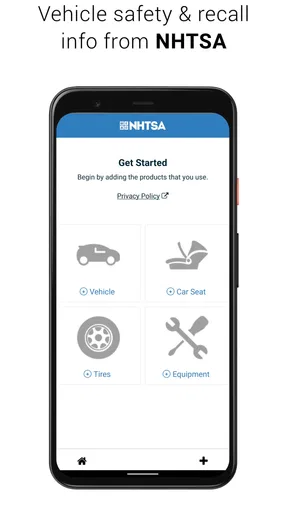
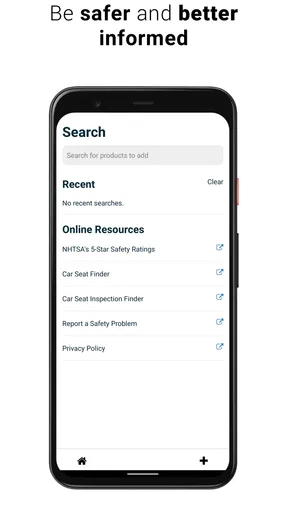
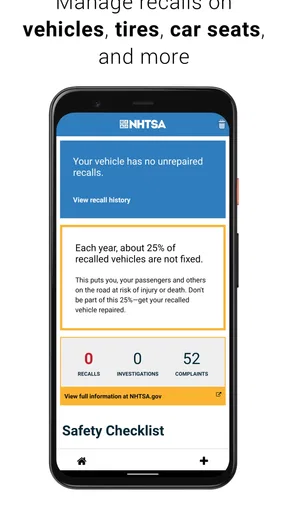
 Analysis by AppCompare
I find SaferCar most useful as a practical household reference: a place to check safety information for a vehicle before a routine trip turns into a question about an unresolved recall. It is an Auto & Vehicles app from the National Highway Traffic Safety Administration, and its focus is narrower than a general car-maintenance or navigation tool. That focus is a strength when I want recall information, but it also sets a clear boundary: I would use it to inform a safety check, not as a substitute for a mechanic, the vehicle manual, or a repair appointment.
When more than one person uses the car
Shared cars make it easy for useful information to stay with the person who bought the vehicle or last looked up its details. I would use this app as one stop in a household handover: check the vehicle’s information, make sure the people who drive it know what needs attention, and agree on who will follow up. That is particularly useful when a car moves between partners, relatives, or a new owner and the previous owner.
A realistic example is a family preparing for a long drive in a car that one person usually uses for commuting. Rather than relying on memory or a casual “I think it was checked,” the driver can look up the vehicle’s recall information and bring any relevant result to the person arranging service. The practical benefit is not that an app repairs anything; it is that a safety question becomes easier to raise and act on before the keys change hands.
Set up a reliable household routine
For a shared vehicle, I would start by identifying which car is being checked and keeping its details accurate when entering them. A VIN is tied to a particular vehicle, so it is worth slowing down to avoid mixing up cars in a household with more than one. If the result does not match what you expect, I would recheck the entered information before drawing conclusions or passing it along.
It also helps to decide who will keep an eye on notifications and who is responsible for arranging any next step. Alerts can make it easier to notice new recall information, but they do not book a repair or ensure another driver sees the message. I would treat a notification as a prompt to verify the issue and coordinate with the vehicle’s owner, rather than as proof that everyone in the household has been informed.
Coordination without confusing account boundaries
SaferCar is best treated as a source of vehicle information, not as a household-management system. I would not assume that one person’s setup automatically keeps every other driver informed. If several people share a car, the simplest approach is to agree on one person who checks the app and then shares the result through the communication method the household already uses.
That division of responsibility matters most when a vehicle changes hands temporarily. A teenager borrowing a parent’s car, for example, may need to know that a recall question is being followed up, while the adult who owns the vehicle handles the service conversation. The app can support that exchange by giving the household a concrete topic to discuss, but the people involved still need to communicate directly.
Worth Reading Before You Choose

EA SPORTS FC Mobile 26 Is a Bigger Football Game, but It Takes Time

Flipboard Shows What News Apps Must Do Beyond the Feed

Switching to Android Auto Means Rethinking Your Driving Routine

Google Calendar Makes a Crowded Week Easier to Manage

Ludo King Makes the Most of the Minutes Between Plans

Baby Panda World Brings Quick Play to Modern Phones, but Its Game Library Feels Busy
Age, trust, and what the information can do
The app is rated Everyone, which makes its intended audience broad, but I would still put an adult in charge of decisions about repairs and vehicle safety. Younger drivers can learn why a recall deserves attention, yet they should not be expected to interpret a result alone or decide whether a vehicle is safe to drive. I would use the information as a starting point for a conversation with the owner or a qualified service professional.
There is also a useful distinction between checking a vehicle and judging its entire condition. Recall information and safety ratings can help answer specific questions, but they cannot tell me whether a particular used car has been maintained well or whether it has a problem that needs diagnosis. For that, I would combine the app with an inspection and the vehicle’s service history instead of treating a clean-looking lookup as a complete safety certificate.
Where it fits among car apps
Compared with a general maintenance tracker, a dealership app, or a repair-shop booking tool, SaferCar has a public-safety emphasis rather than a service-history or appointment focus. That makes it a sensible companion when I want to check safety information without starting with a commercial service provider. On the other hand, if my main need is to track oil changes, manage several maintenance tasks, or schedule a repair, I would choose a tool designed for those jobs and use this app for its more focused role.
For everyday use, I would check the relevant vehicle information before buying a used car, before a long trip, or when a household member mentions a possible recall. Those checks are most helpful when they lead to a follow-up: save or share the result in a way the vehicle owner can find, contact the appropriate service provider if action is needed, and confirm what should happen next. The app can inform that process, but it is not the process itself.
Getting Started with SaferCar
First things first, getting SaferCar onto your phone is a breeze. Available on both Android and iOS, it’s a quick download, and you’re ready to roll. Once installed, the app greets you with a clean, intuitive interface that’s easy on the eyes. No clutter, just straightforward options to guide you through.
Features Galore
Now, this app is packed with features. The main attraction here is the vehicle safety recall information. You just pop in your car’s VIN, and boom, you get instant access to any recalls. It’s like having a mechanic in your pocket, giving you the rundown on what’s up with your ride. Plus, it doesn’t stop there. Ever wondered about the safety ratings of your car? SaferCar has got you covered with detailed ratings and crash test results.
Another snazzy feature is the ability to set up alerts. You can get notifications about new recalls, so you’re always in the loop. It’s perfect for someone like me who tends to forget these things. And let’s be real, who doesn’t love a good reminder?
User Experience
Using the app is as smooth as a freshly paved highway. The navigation is intuitive, and everything is where you’d expect it to be. I didn’t find myself fumbling around trying to figure out where to go next, which is always a plus in my book. The developers clearly put some thought into making the user experience pleasant and straightforward.
Why SaferCar Stands Out
What makes SaferCar stand out is its dedication to safety and reliability. It’s not just about finding recalls; it’s about peace of mind. Knowing that you have access to all this information means you’re driving with confidence. It’s like having a co-pilot who’s always looking out for you and your family’s safety.
Another highlight is the app’s commitment to user privacy. In a world where data is gold, knowing that your information is handled with care is reassuring. SaferCar doesn’t overreach, and that’s something I truly appreciate.
A sensible fit for safety-minded drivers
SaferCar is free, has an Everyone age rating, and has a 3.8 average from around 450 ratings. Its reach is over 100,000 installs, and version 1.4.4 is the current release. I see those details as useful context rather than a guarantee: the app’s value depends on whether you want government vehicle-safety information, not on how many people have installed it.
It is a good fit for drivers who want a straightforward way to check recall information and safety ratings, especially if they keep a car for years or help manage vehicles for relatives. It is less suitable for someone expecting a complete ownership dashboard, repair diagnosis, or a way to coordinate every driver automatically. If you already rely on a mechanic or dealership for service reminders, this app can still serve as a separate check, but it will not replace that relationship.
Small habits that make a lookup more useful
One useful habit is to check a vehicle when something changes, rather than waiting for an annual maintenance appointment: after buying a used car, when a family member starts driving it, or before a trip that makes unresolved safety questions feel more urgent. I would also make sure the VIN is copied carefully from the vehicle itself rather than from an old message or paperwork that might belong to another car. That simple pause is especially worthwhile in a multi-car household.
Another good practice is to separate “I checked” from “the issue is handled.” A lookup can identify information to follow up, but the next step may require contacting a service provider or confirming the vehicle’s status with the person responsible for it. If an alert appears, I would read it, tell other regular drivers what it means for the household’s plan, and make a note of who is handling the follow-up. That turns a notification into a useful action instead of another item that gets lost in a phone.
What to expect from alerts and results
Alerts are most valuable when the phone belongs to someone who will actually see and act on them. If one person owns the car but another person drives it daily, I would not rely on the driver’s app alone; the owner should remain part of the loop. And if several vehicles are involved, keeping each lookup clearly associated with the correct car avoids a common household mix-up: assuming a result for one vehicle applies to another.
A result should also be read in context. Recall information is a specific safety check, not a report on wear, accident history, maintenance quality, or every possible mechanical fault. Similarly, ratings and crash-test results help with research, but they do not assess the present condition of an individual vehicle. When I am considering a used car, I would pair the app’s information with an in-person inspection and a conversation about service records rather than allowing one lookup to settle the whole decision.
Where another tool is the better choice
The usual alternatives solve different problems. A maintenance app is better for recording routine work and reminders; a repair-shop or dealer tool is more practical for booking service and communicating about a specific repair. SaferCar’s advantage is that its purpose is centered on safety information, so I can make an independent check before deciding whom to contact. I would use it alongside those tools when needed, not expect it to duplicate their service features.
It is also not the right answer when a vehicle is showing a worrying symptom. A warning light, unusual noise, or change in how the car handles calls for proper diagnosis, not just a recall search. The app can help answer whether a known recall is relevant, but it cannot inspect the car or tell me that it is safe to continue driving. In that situation, I would seek qualified help and use the app as supporting information rather than as the decision-maker.
My household verdict
For a household that shares cars, I like SaferCar as a focused, low-friction reference that can make a recall check part of normal vehicle care. Its strongest role is helping people ask a better question and pass useful safety information to the person who can act on it. The trade-off is that coordination remains a human responsibility: the app does not remove the need to share results, arrange service, or check that everyone understands the plan.
If you want a simple safety-information companion, I think it is worth trying. If your priority is maintenance logging, repair booking, or a complete picture of a used car’s condition, choose a more specialized tool for that job and keep SaferCar in its lane. I would recommend it to a friend who wants an accessible recall and safety check, while reminding them that the real peace of mind comes from following up on what they find.
Final Thoughts
If you’re someone who values safety and wants to stay informed about your vehicle, SaferCar is a no-brainer. It’s user-friendly, packed with essential features, and it genuinely makes me feel more secure on the road. While it might not be the flashiest app out there, it does exactly what it promises and does it well. So, if you haven’t already, give SaferCar a try. Your future self will thank you.
Pros
- User-friendly interface for easy navigation.
- Provides real-time vehicle recall alerts.
- Includes detailed maintenance reminders.
- Access to safety ratings and crash test results.
- Compatible with both Android and iOS devices.
Cons
- Limited to U.S. vehicle data only.
- Requires internet for full functionality.
- Can drain battery with GPS use.
- No offline recall information access.
- Lacks integration with some car models.
FAQs for SaferCar
What is the primary function of the SaferCar app?
SaferCar is designed to enhance vehicle safety by providing users with recall information, safety ratings, and updates on their registered vehicles. By entering your vehicle’s VIN, the app offers real-time alerts on recalls and other critical safety information, ensuring you can address any potential issues promptly.
How do I register my vehicle with the SaferCar app?
To register your vehicle, download the SaferCar app and create an account. Enter your vehicle's VIN (Vehicle Identification Number) into the app. This allows the app to track and provide updates on recalls and safety notices specific to your vehicle, keeping you informed and safe on the road.
Does SaferCar provide information about all types of vehicles?
Yes, SaferCar offers safety information for a wide range of vehicles, including cars, trucks, motorcycles, and more. By using the VIN, the app tailors its notifications to the specific make and model, ensuring you receive accurate and timely updates relevant to your vehicle type.
Is there a cost associated with using SaferCar?
SaferCar is a free app provided by the National Highway Traffic Safety Administration (NHTSA). There are no hidden fees or subscription charges, making it an accessible tool for anyone interested in monitoring vehicle safety and staying updated on safety recalls.
Can I manage multiple vehicles with the SaferCar app?
Yes, SaferCar allows users to manage multiple vehicles within the app. You can enter and track several VINs, enabling you to receive recall and safety information for each registered vehicle. This feature is particularly useful for families or individuals with multiple vehicles.


